








In this issue:
- › BlackBerry Travel app & more great apps for travel
- › Enter the Travel Better with BlackBerry Contest
- › Synch up with your current time zone
- › Set your home time zone
- › Roam away
- › Map out your trip
- › Check in with mobile boarding passes
- › Be Prepared – what else to take with you
- › Sharing your trip on social networks
Get Connected.
Sign up today and you'll be on an exclusive list of those who are the
first to hear of the very latest from BlackBerry®. Get more out of your
device by knowing more about what it can do for you.


Check out our quick tips for mapping out your trip, using clever apps to find the best spots in town, and ways your BlackBerry smartphone can intuitively sync your calendar with travel itinerary updates helping make sure you don't skip a beat. Even find out how you could win an all expenses paid trip to Australia1! Enjoy your trip.

BlackBerry Travel App & more great apps for travel
BlackBerry Travel super app
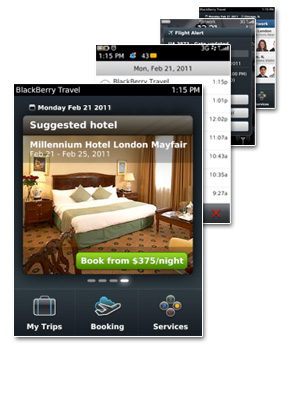
Like your personal mobile travel agent. But at your fingertips. BlackBerry® Travel™2 is a new FREE intuitive Super App with features that provide:
Automatic Trip Scanning When you book, the automatic trip-scanning feature pulls in details from itineraries emailed to you – no matter where you booked. It can even identify gaps – like a hotel stay that ends a night early – and recommend solutions.
Search and Book Hotels Simply search for hotels in the area you'd like to stay and book the one that suits your needs and budget – right from your BlackBerry® smartphone. To make it easier, hotels are ranked according to location, price and quality.
Find Alternate Flights Flight cancelled or delayed just as you arrive at the airport? Search for flights to and from any airport worldwide to find a new flight quickly and easily. And to make it even easier, the app takes your current location into account and searches based on departure and arrival airports.
Travel Notifications find out early if there are any flight delays, cancellations or other changes that could affect your plans, all sent right to your BlackBerry smartphone.
Share Your Travel Plans stay in touch with those who mean the most and share your trip plans via email or LinkedIn®.

More great apps for travel in BlackBerry App World
Translate foreign languages, use mobile guides and even find an exotic local restaurant. Can't figure out how your dollar converts? Find more travel apps in BlackBerry® App World™
Travel Better with BlackBerry for your chance to win a trip down-under!
Want to win the ultimate Aussie getaway? Visit the iconic Sydney Opera House in person, snap a picture with a kangaroo, and say g'day to everyone you meet.
Enter the Travel Better with BlackBerry contest for your chance to win an all-expenses-paid trip to Australia1 and experience first-hand how much better it is to travel with your BlackBerry smartphone and the BlackBerry® Travel™ app. Bonza!
› CLICK HERE to enter — See full details on contest website
› Back to Top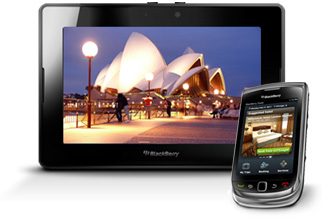
Travel Better Tips – across country or abroad

Sync up with your current time zone
You'll have lots on your plate when you first arrive at your destination, and changing your time zone can easily slip your mind. Set up your BlackBerry smartphone to automatically sync with your current time zone, helping to make sure you're ready for your connecting flight or arrive on time to see the kick-off at the football game.3
Here's how:
Before you begin: To perform this task, your BlackBerry® smartphone must be connected to the wireless network.3- 1. Open the clock application
- 2. Press the Menu key
- 3. Click Set Time
- 4. Change the Update Time field to Automatic
- 5. Perform one of the following actions:
- • To receive a prompt when your device detects a new time zone, change the
Auto Update Time Zone field to Prompt - • To have your device update the time zone automatically when it detects a new time
zone, change the Auto Update Time Zone field to On
- • To receive a prompt when your device detects a new time zone, change the
- 6. Press the Menu key
- 7. Click Save
Set your home time zone
Stay in tune with the clocks back home so no one gets a call in the middle of the night.
Here's how:
- 1. On the Home screen or in the Applications folder, click the Clock icon
- 2. Press the Menu key > Options
- 3. Change the Home Time Zone field
- 4. Press the Menu key > Save
› Back to Top

Roam away
It's easy to unknowingly stumble into a roaming zone, sometimes even when you're in your own country. Before your trip, check with your wireless carrier to find out what voice and data roaming coverage is included in your current plan or what travel plans are available for your trip. If you don't need data on all the time and to limit potential data charges, you can set your Mobile Network options so that Data Service is off when roaming. (Remember to turn your data service back on to use maps and others apps).
Here's how:
- 1. Click the Manage Connections icon
- 2. Click Mobile Network Options
- 3. Perform one of the following actions:
- • To turn on or off data service, change the Data Service field
- • To turn on or off data service when roaming, change the
change the While Roaming field - • To receive a prompt when roaming that allows you to turn on or turn off data service,
change the While Roaming field to Prompt
- 4. Press the Menu key > Close
› Back to Top

Map out your trip
Things can turn into a frenzy when you're on the road. Fast. By marking destinations in BlackBerry® Maps ahead of time, you'll be saving yourself time so you're free to snap a memorable picture or have a leisurely lunch.
Find where you areFor when one street corner or park looks exactly like the one before - get your bearings. (Launch BlackBerry Maps > Menu Key > My Location)
Bookmark a locationYou've found it. The luxurious hotel you need to book for your anniversary. Add it to your favorites for a quick find later and get back to your romantic evening. (Menu Key > Find Location > Enter Address > Add to Favorites)
Get directionsWhen time is of the essence look up the best route to help make sure you stay on schedule. (Menu Key > Get Directions > Enter location > Select route preference > Search)
Send directionsAre you leading the way for a convoy of friends? Or maybe trying to send them directions to a housewarming at your new condo? Use the Send Directions menu option to send directions easily via email, BlackBerry® Messenger™, social apps, and more. (After getting directions to a location: View On Map > Menu Key > Send Directions > Select how you want to send it3)
› Back to Top

Check in with mobile boarding passes
No one likes waiting in a long check-in line at the airport, especially if you're about to depart on your long awaited trip to the Bahamas. Help save time with a mobile boarding pass. Many airlines offer them to save time and paper, so check with your airline before departure to see if your BlackBerry smartphone can get you in – faster. Some airlines offer a BlackBerry app that includes mobile check in as well as an electronic boarding pass. Take a look in BlackBerry App World3.<sup>4</sup>
› Back to Top
Be Prepared – what else to take with you
You might have a packing list a mile long. But just remember to bring these few vital accessory items along with your BlackBerry smartphone and your trip won't hit any turbulence.
Your travel checklist:- • BlackBerry smartphone
- • Charger
- • A spare battery
- • Travel adapters for charging if going abroad
- • Extra SD card for pictures & music
 › Back to Top
Share Your Voyage
Sharing your trip on social networks
Your friends and family don't have to be with you on the trip to share your journey. By sharing your latest picture beside the Sydney Opera House it lets everyone know you're thinking of them. Send them emails, BBM™ them on the go, check in to Facebook places to let everyone know where you are, or post messages on their wall to tell your story.
 Facebook® for BlackBerry smartphones4
 Twitter® for BlackBerry smartphones4
 LinkedIn® for BlackBerry smartphones5
 BBM4
BBM4

Sign up today and you'll be on an exclusive list of those who are the first to hear of the very latest from BlackBerry. Get more out of your device by knowing more about what it can do for you.